Adding Automatic, and Overview List, Pulls
Adding tools to pull new work without needing to think about it.

Last week I spoke about two pull oriented features that, after using Kantan Kanban for a week, seemed to be more important than I had anticipated.
Improved Pulling Tasks
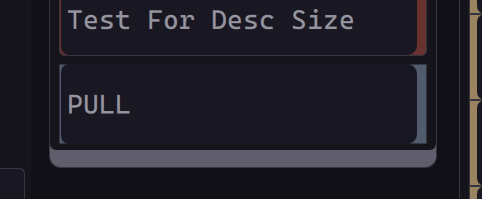
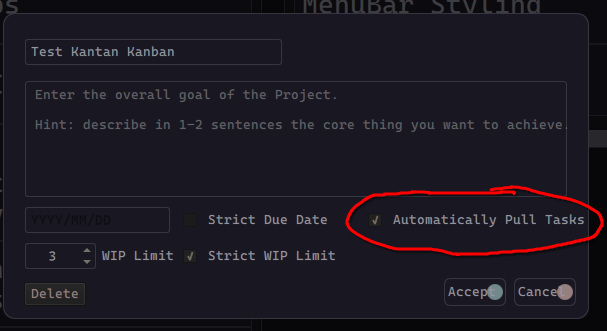
The day after posting, I added automatic pulls, along with the Overview To Do List pull feature. While overall adding both features was easier than I expected, some subtle and not-so-subtle issues have popped up. The biggest surprise was the two features interacting to skirt a check - leading to a crash. While that has been fixed in a way I’m confident is robust, I have some additional tests to run, and edge-cases to hit, to make sure that it’s truly comprehensive - since the auto-pull loop has caused issues a couple of times.
Pull Button at the bottom of the Overview To Do List
Option to Enable/Disable Automatic Pulls for a Board
This has also made me think that it would be worth looking into unittest and learning more about how to implement it with a GUI program. I think I’m getting to the point where informal tests aren’t sufficient.
Overall I’m pleased with both features and think that they add real value by cutting the need to skim through each board for your next task. It will just take time to know if they are as critical to streamlining workflow as I think they might be.
Packaging
With the expanded pull logic in place and working, the next step will be to build at least a Python package and test that everything works as expected outside of my development folder. Given that I’m not bundling non-Python data, and I worked to keep dependencies at a minimum, I don’t think there should be significant problems.
I’ll be looking into setuptools, with the goal to add a CI/CD (Continuous Integration/Continuous Delivery) setup where when I tag a new release, GitLab can build: a Python package, a Windows Executable, a Mac package, and an AppImage. I did a bit of experimentation with that for my game backlog app, but that had enough extra bundled data that it isn’t a 1:1.
Take-away
The fact that I was surprised that the Overview Pull feature triggered the Automatic Pull feature is an example of not spending quite enough time thinking through or mapping out how different features (or just process actions) could interact. As soon as it happened, it seemed obvious that an Overview Pull could result in a board auto-pulling tasks, and that there was a risk it could bypass safeguards or create a slight disconnect between parts of the GUI.
So this is a good opportunity to remind myself, and others, to take a few moments when changing or adding process(es), to do at least a rough map of what those changes will touch on, and if there are ways they could disrupt how the process completes.
While there’s always a chance you’ll miss something, by taking the time before you make changes you’ll lower the risk you’ll need to scramble or redo the work.
In other words: “Measure twice, cut once”.
Next Time
I’ll be testing out packaging the program, and expect to have it live on PyPi.org by the next post. So I’m sure I’ll cover that a bit. But I’ve also seen a number of interesting AI/LLM articles and studies over the past week or two, which I think would be interesting to cover - which will be my main focus.
Photo credit: Photo by Tracey Parish on Unsplash